q: On a windows system, how can we copy permissions from one folder to another?
a: With PowerShell using the Get-ACL / Set-ACL commands.
Get-Acl C:\Windows\System32\LogFiles | Set-Acl D:\Windows\System32\LogFiles
q: On a windows system, how can we copy permissions from one folder to another?
a: With PowerShell using the Get-ACL / Set-ACL commands.
Get-Acl C:\Windows\System32\LogFiles | Set-Acl D:\Windows\System32\LogFiles
Q: Customer called about having to close 4 windows prompting them to migrate to Outlook (new).
A: We uninstalled the Outlook (new) app from Installed Apps, created a new key in the registry, rebooted, and then Outlook (classic) seemed to open just fine. Either manually create this key, or save the 4 lines to a file name DisableNewOutlook.reg and run it on the computer.
Hide the Try the new Outlook toggle in classic Outlook:
Windows Registry Editor Version 5.00
[HKEY_CURRENT_USER\Software\Microsoft\Office\16.0\Outlook\Options\General]
"HideNewOutlookToggle"=dword:00000001
Q: The customer called with a server with multiple IIS sites each with secure bindings using an SSL Certificate that will expire soon. How can they automate updating the bindings on each site?
A: Using this Powershell script, found online, they can run it locally from an elevated Powershell window / or remote script utility. Identify the SSL Thumbprint of the expiring certificate as well as the new certificate. Update lines 2 & 3 accordingly then run it.
Error: Customer reported they could not send emails from their charter.net email address through mobile.charter.net over 587 SSL when they were on their Clearwave wireless network. If they turned off wifi, emails would send.
Answer: We configured Mozilla Thunderbird on their Clearwave network to use Charter, it immediately threw this error when we tried to send:
An error occurred while sending mail: Outgoing server (SMTP) error. The server responded: impout004.msg.chrl.nc.charter.net cmsmtp *.*.*.* blocked. Please see https://www.spectrum.net/support/internet/understanding-email-error-codes for more information. AUP#Out-1130.
1100 - 1150
The IP address you’re trying to connect from has an issue with the Domain Name System. Spectrum requires a full circle DNS for emails to be allowed through. Verify the IP you’re connecting from, and check the IP address to ensure a reverse DNS entry exists for the IP. If the IP address is a Spectrum-provided email address, contact us.
Summary: It seems, as a security measure, Spectrum will not let your IP connect to their outbound email relay servers if your public IP does not have a PTR / reverse lookup DNS record, of any kind. It just needs to exist, it does not have to match your company name or domain name or anything.
We contacted Clearwave support and requested a DHCP PTR record be created. They obliged and created it. Mozilla was able to send emails and their phone worked too. NOTE, with a dynamic address, if their IP changes, they will have to contact support again, but it works for now.
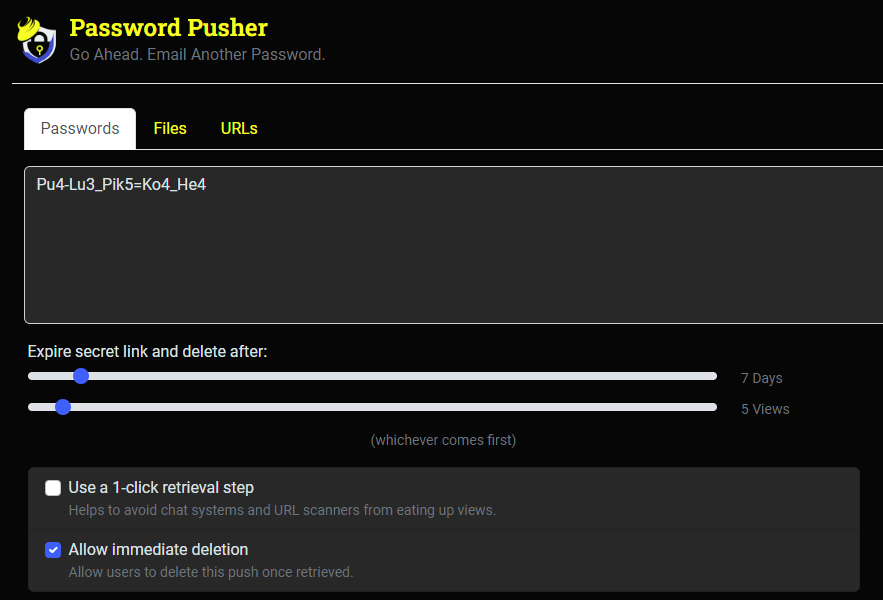
q: With password complexity on the rise, what is a quick way to securely share a password without trying to spell it over the phone?
a: Password Pusher - https://pwpush.com/
You can provide your own data to share, or let the site generate a string for you.
You can control expiration by Day and View count.
You can even require a password, to access this string.
You can also share files & URLs securely.
q: Customer called with Google Workspace blocking their access to log into a user account via webmail.
Google
We couldn’t verify it’s you
We want to make sure it’s really you trying to complete this action.
To help us verify it’s really you
Use a device and browser you’ve signed in on before
Use a familiar Wi-Fi network, such as at home or work
a: Simply disable login challenge and it will let you through.
Log into Google Workspace Admin https://admin.google.com/
Click users
Click the user / username affected
Click the ‘Security’ section
Click ‘Login challenge’ - Turn off identity questions for 10 minutes after a suspicious attempt to sign in
Click <TURN OFF FOR 10 MIN>
Then try to log in as that user again.

